- Core Web Vitals - What Are They And How They Affect Your SERP
- What Are Core Web Vitals
- The 3 Core Web Vitals Defined
- How Core Web Vitals Affect Site Performance
- New Labels For Search
- Optimizing for Core Web Vitals
- Wrapping Up
Core Web Vitals - What Are They And How They Affect Your Website's SERP
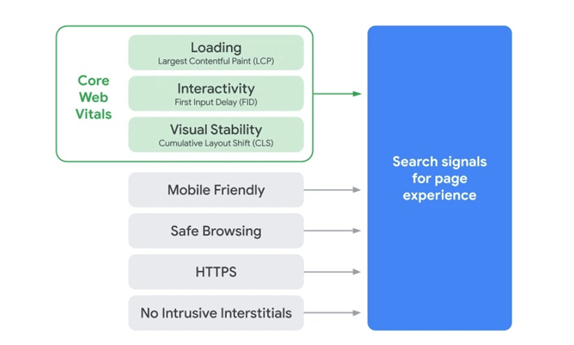
Google announced their User Experience algorithm update in May of 2021 stating that core web vitals would play a role in determining search ranking. This update combines the existing UX-related signals such as mobile-friendliness, safe-browsing, HTTPS-security and intrusive interstitial guidelines to become a key ranking signal on Google.
In this post, you will learn what core web vitals are and how they impact your ranking in search results. We also uncover important tips about how you can optimize your website to meet Google’s criteria for higher ranking and increased visibility.
What Are Google’s Core Web Vitals?
Core web vitals are a combination of several metrics designed to measure how users perceive the experience of interacting with a web page. In this update, Google wants to ensure that only sites that provide simple and seamless experience show up on the top of search engine result pages (SERPs) for specific search terms or keywords.
Core web vitals are a subset of Google's overall evaluation of Page Experience, a longstanding ranking signal. The metrics that define Core Web Vitals will change over time along with changes in a user’s expectation of web pages. The current set of metrics focus on three important aspects of the user experience, including load speed, interactivity and visual stability.
Here are the three Core Web Vitals and their meanings:
- Largest Contentful Paint (LCP): This metric refers to how long it takes the main content on a webpage to load. Google recommends that the LCP should occur within 2.5 seconds or faster from when the page first starts loading.
- First Input Delay (FID): This refers to the time it takes for a web page to become interactive. To provide a good user experience, your web page is expected to have a FID of less than 100 milliseconds.
- Cumulative Layout Shift (CLS): This refers to the amount of unexpected layout shift of a page’s visual content. To provide a good user experience, a page should maintain a CLS of less than 0.1.
Core Web Vitals And How They Affect Your Site’s Performance
Core Web Vitals are about your page performance and how it affects web visitors. A website with low-quality page experience will naturally discourage visitors. For example, if it takes a long time for a page to load, it will have a severe effect on bounce rates which is a signal to Google that your page is not user-friendly.
Likewise, interruptions and errors due to instability in the graphic appearance of the page can make good user experience impossible, hereby reducing the dwell time on your website. On the contrary, fewer shifts result in less chances for interruption and error.
According to a recent case study by Web Vitals, an initiative by Google, if a page load time increases from 1 second to 3 seconds, bounce rate increases by 32%. The bounce rate further increases by 106% as page load time increases from 1 second to 6 seconds.
The same study found that when a site meets the thresholds for Core Web Vitals, users are 24% less likely to abandon such a page. The study specifically looked at news and shopping sites, sites whose businesses depend on traffic and task completion, and discovered a similar outcome: 22% less page abandonment for news sites and 24% less abandonment for shopping sites.
The Introduction Of New Labels In Search Results
Google has suggested that they’re going to add labels in search results that show which results provide a quality page experience. The search engine perfected works on visual indicators that will make it easy for users to identify pages that have met all of the page experience requirements explained earlier.
While Core Web Vitals are not the only ranking factors in Google’s ranking algorithm, they constitute the largest chunk of Page Experience score. Having said that, it’s important for you to run a thorough check of your website and see where you stand in light of the imminent update rollout. This can help you quantify the experience of your website and identify opportunities to improve.
How To Optimize Your Website For Higher Page Experience
Google has released a variety of tools that you can use to start improving your page experience. But the first step is doing a site-wide audit of your pages to see where there is a need for improvement. You can dig up your site’s Core Web Vitals data in the “enhancements” section of your Google Search Console account.
Largest Contentful Paint (LCP)
Once you’ve identified opportunities for improvement, you can leverage tools like PageSpeed Insights and Lighthouse to help you as you iterate on fixing any issue that you’ve found. These tools come in handy and can provide you useful insights about what you need to improve your site’s load speed.
PageSpeed Insights, for example, analyzes your website using field data which reflect the real-world experience of a critical user-focused outcome.
Although PageSpeed Insights provides you useful data about your LCP, it can only analyze a page at a time. This is where you need Google Search Console. Like Google PageSpeed Insights, data in GSC comes from the Chrome User Experience Report and it allows you to see all relevant LCP insights on your entire website. Instead of analyzing random pages one by one, you can get a list of URLs that are good, bad or somewhere in-between.
LCP reports are divided into three buckets – Good, Needs Improvement and Poor.
For example, an LCP of 2.5 seconds or less is considered "Good"; 2.5 to 4.0 seconds "needs improvement" while 4.0 seconds or more is "Poor".
Here are some recommendations to improve your page load speed:
- Reduce the dimensions of background images: large background images are common culprits when it comes to slow page load speed. You can either reduce the size to a maximum of 100kb or decide to remove it entirely if its removal will not negatively impact user experience.
- Implement lazy loading: With lazy loading, images only load as the web visitor scrolls down your page. This helps achieve faster LCP.
- Remove Large page elements: Large page elements such as large video files or bulky CSS can delay LCP times. A tool like Google PageSpeed Insights can tell you if your page has an element that’s slowing down your page and how you can possibly fix it.
First Input Delay (FID)
FID refers to the time it takes for a web page to become interactive. Examples of interactive activities on a website include, choosing an option from a menu, entering an email into a field, and clicking on a link in the site’s navigation. Google considers FID an important metric because it takes into account how real-life users interact with websites.
Like LCP, a site's FID is grouped into three buckets, including good, needs improvement and poor. The ideal FID time is 100 ms. Anything beyond needs improvement. Sites that deal with 100% content such as blogs or news sites shouldn’t have much issue with meeting the FID requirements since there’s little or no need for users to login or input their info.
Here are recommendations on how you can improve your site’s FID score:
- Minimize JavaScript: It’s difficult if not impossible for users to interact with a page while the browser is loading up JavaScript. The solution is to either minimize or defer JS on your page to improve FID score.
- Use a browser cache: Using a browser cache can help improve user experience by loading JS faster.
- Remove inessential third-party scripts: Third-party scripts like Google Analytics and heatmaps can negatively impact FID.
Cumulative Layout Shift (CLS)
This parameter is focused on visual stability. Put simply, if elements on your page moves around as the page loads, they’ll have a high CLSs which page for Page Experience. You need to ensure that every element on your page is fairly stable when it loads up. This encourages visitors to stay longer on your page. The ideal CLS score is 1.0 or less.
Here are some recommendations to improve your CLS score:
- Make sure ads elements have a reserved space - This helps you prevent the chances of ads pushing content down, up or to the side.
- Additionally, Google recommends AMP as one of the easiest and cost-effective ways for publishers looking to achieve improved page experience outcomes.
- Google Accelerated Mobile Pages (AMP) is an open source framework developed to help you create websites, stories, emails and ads that are designed with the user in mind. They are targeted at delighting the user and providing lightning-fast, high-quality experience in multiple forms. The majority of the AMP pages record great page experience.
- If you’re an AMP publisher, you can check the recently launched AMP Page Experience Guide. It’s a diagnostic tool that provides actionable insights about how best you can optimize your website for greater user experience.
Wrapping Up
Optimizing the quality of user experience is crucial to the long-term success of any site on the web. Whether you're a business owner, marketer, or developer, Core Web Vitals can help you improve your ranking and boost visibility in search results. If you need professional assistance auditing your site’s performance and optimizing your site for Core Web Vitals, schedule a consultation call with us right now to discuss your needs.
[/et_pb_text][/et_pb_column][/et_pb_row][/et_pb_section]Original post here: Google’s Core Web Vitals







 There’s no arguing the fact that SEO is the most important factor for driving organic traffic. But as web designers begin to dabble in web development, they may find themselves neglecting many of the technical SEO aspects of the web. Technical SEO is a very important aspect of website design that often gets overlooked. It is the foundation upon which you build a site and helps determine the site’s overall ranking. The lack of attention to technical SEO can have a negative impact on the success of a website. I've reviewed a lot of websites and am always surprised when I do a basic site audit and find so many basic technical SEO elements not used correctly or missing entirely. To me this seems like a disservice to a client. How can you do good SEO without taking basic design into account? In an ideal world, a company’s website would be the best possible representation of its brand. In reality, this is rarely the case. In fact, most sites don’t even rank in the top 5 for anything. Let’s take a look at what technical SEO elements a web page needs to have in order to rank well in search results. In my opinion these should be mandatory and it's disappointing to see so many web design firms omit or ignore them altogether. The elements we think are important are based on our real-world research and testing - not on what someone wrote in an article somewhere.
  1. Title Tag: Title tags are what you see when you click on a title in a browser. They are an important element of the link between the searcher and your web page. It is highly recommended that you use a keyword-phrase in the title tag. This helps to make your web page more relevant to potential visitors. 2. Meta Description: Each page needs a meta description that describes the content of the page with an optimal length between 70 and 320 characters. This should summarize the page and "sell the page". The meta description is what you see when you perform a search. 3. Header Tags: Header tags are used to structure a document and provide information to users about the document's structure. Each page should have only ONE H1 tag. Header tags should follow the correct heirarchy order (H1, H2, H3, H4, H5, H6). Search engines will give more weight to web pages that have clearly defined headings, which help to improve search results. Headings also play a critical role when it comes to screen readers for someone who is visually impaired. 3. Keyword Consistency: Keyword/keyword-phrases should be distributed across important HTML tags like the Title, Description, Header tags, and page content. 4. HTML Structure: HTML stands for HyperText Markup Language, and is what creates a web page. HTML is also used to create forms, videos, and other documents. A web page's HTML should be clean, simple, and organized. It should follow best practices and be easy to read. 5. Alt Tags: Alt attributes are an often overlooked and simple way to signal to Search Engines what an image is about, and help it rank in image search results. Alt tags are used in place of images for web pages that cannot load any images. These tags are also used by screen readers. 6. Schema.org: Schema.org is a type of structured data markup that describes the content on your web page and is used by search engines to understand your content. 7. Content: Content is the information that you want to share on your web page. It could be text, audio, or video. Having good keyword-rich content helps reinforce your page authority to search engines. Ideally you want your content to have a mixture of text & images and contain around 1,000 words. 8. XML Sitemap: You may already be familiar with the concept of a sitemap. A sitemap is a list of pages on your site that outline the content and links within the website. When you make changes to your site, you can easily add these pages to the sitemap. The sitemap is crucial to a successful website. Google and other search engines use this information to determine what your website offers. 9. Linking: Internal linking of web pages is important and often overlooked. Not just using a menu - interlinking pages by the use of anchor tags can boost page rank. All of these technical SEO elements should be used correctly on every page of a website. Unfortunately in a lot of cases, that's not true. Here are some of the errors I see frequently: 1. Title tag too short or too long. 60 characters is optimum. 2. Title tag doesn't include the main keyword/keyword-phrase. 3. Meta description missing. 4. Meta description doesn't include keyword/keyword-phrases. 5. H1 tag missing. 6. Multiple H1 tags. 7. Keyword/keyword-phrase not included in header tags 8. Header tags out of order. 9. Header tags not used. 10. Alt tags not used. Good web design and SEO can live together in perfect harmony. It doesn’t matter how good your website looks if no one can find it. Search engines such as Google and Bing make decisions about where to rank websites based on various factors. Your website’s content and the structure of your website pages are often among the most important ones. However, a combination of both is best! It may seem redundant, but consider SEO as a part of the project, not an afterthought. Think about the keywords and phrases you want to rank for, how users will find your content, and what types of content they might want to find. A well-designed site that offers useful information, easy navigation, and an easy-to-read layout will make it easier for visitors to find what they’re looking for and keep them on the site longer. A well-optimized website that ranks well for keywords in search results is sure to bring traffic and revenue to your business! We incorporate proven technical SEO elements during our website design phase on sites we develop at Team 218 Web Services. If you have questions about Web Design and SEO or anything covered in this post,